Spot the phish: 5 red flags in a dodgy email
Phishing emails are getting better. The spelling mistakes and dodgy formatting that used to give them away? Largely a thing of the past. Today’s phishing attempts can look slick, professional, and entirely convincing — which is exactly what makes them dangerous.
The good news is that even the cleverest phishing emails tend to share a handful of telltale signs. Once you know what to look for, they’re much easier to catch.
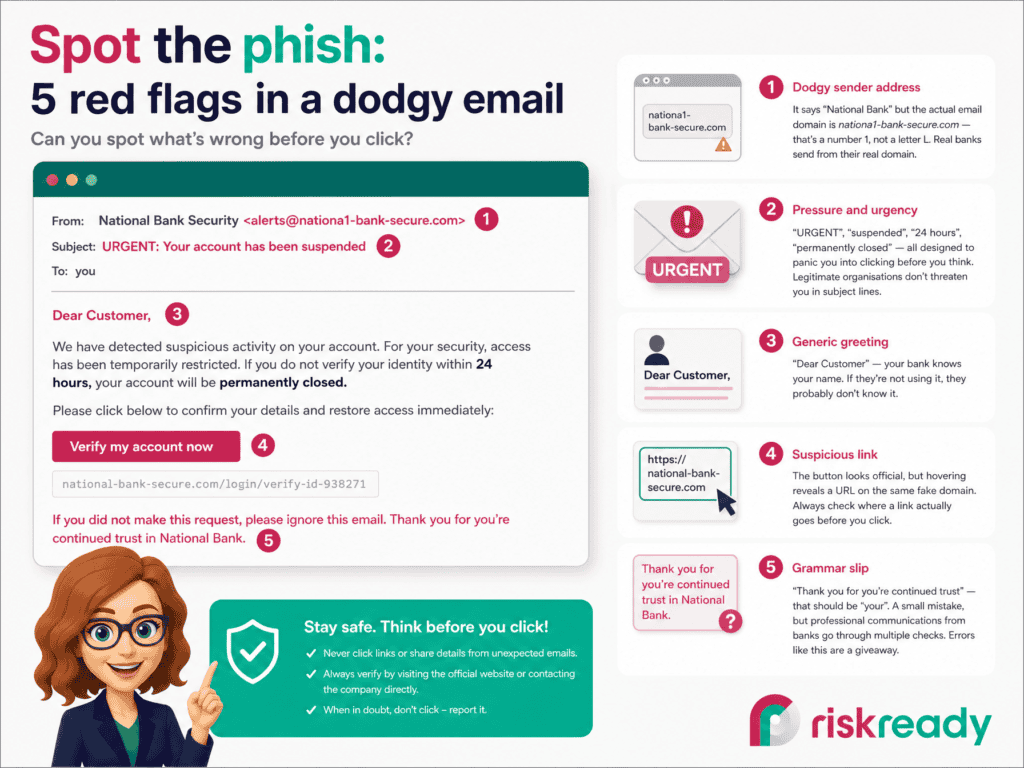
We’ve put together a quick visual guide — a mock phishing email with five common red flags highlighted. It’s the kind of thing you could share with your team as a reminder, pin to a noticeboard, or use as a conversation starter in your next awareness session.
A closer look at each red flag
1. The sender address doesn’t quite add up
This is the first thing to check, and it catches a surprising number of people out. The display name might say “National Bank Security” but the actual email address tells a different story. In our example, the domain uses a number 1 instead of the letter L — subtle enough to miss at a glance, obvious once you know to look.
Get into the habit of clicking on the sender name to see the full email address. If the domain doesn’t match the organisation’s real website, that’s your answer.
2. It’s trying to rush you
“URGENT.” “Your account has been suspended.” “You have 24 hours.” Every word is designed to trigger a panic response — because when people panic, they click without thinking.
Real organisations do send important emails, of course. But they don’t typically threaten to permanently close your account unless you act immediately. If an email is making your heart rate spike, take that as a sign to slow down, not speed up.
3. It doesn’t use your name
“Dear Customer” is a classic. Your bank, your energy provider, your employer — they all know your name. A generic greeting is a strong signal that the sender is casting a wide net and hoping someone bites.
It’s not foolproof on its own (some legitimate mass emails do use generic greetings), but combined with other red flags, it’s a useful indicator.
4. The link goes somewhere unexpected
This is where the real danger lives. The button says “Verify my account now” and looks perfectly professional, but hovering over it reveals a URL on a completely different domain. On a phone, you can long-press a link to preview where it leads without opening it.
A good rule of thumb: if an email asks you to log in to something, don’t use the link in the email. Open your browser and go to the website directly.
5. There’s a grammar or spelling slip
“Thank you for you’re continued trust” — a small error, but a telling one. Professional communications from established organisations go through multiple rounds of review. The odd typo in a phishing email often slips through because the sender is working quickly, possibly in a second language, and doesn’t have a compliance team checking their work.
One grammar mistake doesn’t guarantee a phishing email, but it’s another piece of the puzzle.
What to do if you spot one
Don’t click anything. Don’t reply. Don’t forward it to colleagues with a “look at this!” (you’d be surprised how often someone in the chain clicks the link anyway).
Instead:
- Report it using your organisation’s phishing reporting process — many email clients have a dedicated “Report phishing” button
- If you’re not sure whether it’s genuine, contact the supposed sender through a channel you trust (their real website, a phone number you already have)
- Delete it
Want to go deeper?
Spotting phishing emails is one of the topics covered in our ISO 27001 Staff Awareness course, alongside other everyday security risks like data breaches, password management, and safe working practices. It’s designed for everyone in an organisation — not just the IT team.