If you’ve had an email recently telling you your data was caught up in a “cyber security incident”, Manchester Airport’s recent breach notification will be a familiar shape to a lot of people right now. The natural reaction is to read it once, feel briefly uneasy, and then do nothing with it. That’s understandable. Most of these emails are long on reassurance and short on anything you can actually act on.
There’s plenty already written about how to spot a fake version of this kind of email. This isn’t that. This is what’s actually worth doing once you know the one in your inbox is real.
Don’t click anything in the email, even though it’s genuine
This sounds like advice for spotting a scam, but it applies just as much to a real notification. If you want to check your account or booking, go there directly through the company’s normal website or app, not through a link in the email. A genuine breach notification is telling you something has happened, not asking you to log in or verify anything through it. Getting into the habit of ignoring links even in real emails is exactly what makes you harder to catch out the next time someone sends a fake version of the same message.
Read what was actually taken, not just whether it was “financial”
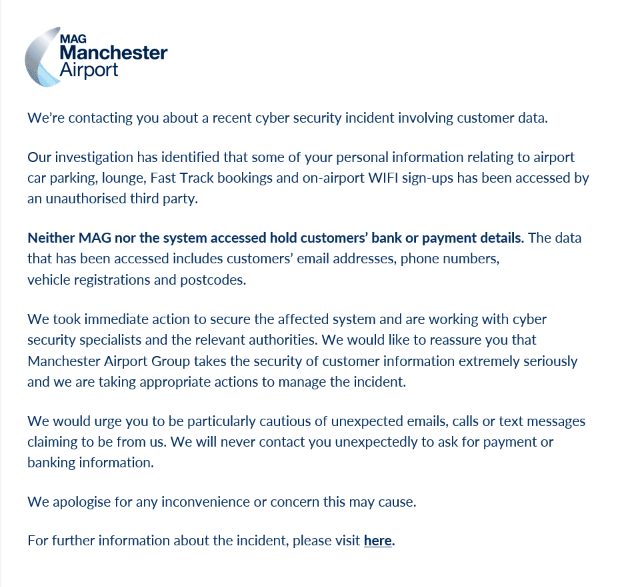
Every notification leads with whether your bank details were involved. That matters, but it’s not the whole picture. If what was taken includes things like your phone number, postcode, or, as in the Manchester Airport case, a vehicle registration number, that’s still enough for someone to put together a convincing follow-up message. Read the actual list of what was accessed rather than stopping at the headline reassurance, and think about what someone could realistically do with those specific details, not with “data” in the abstract.
Expect the follow-up, not just the original email
The real risk from a breach like this usually isn’t the notification itself. It’s what turns up weeks later: a text about your parking booking, a call about a problem with your account, an email that mentions a specific detail, like your postcode or the car park you used, that makes it sound legitimate. Assume that contact is coming, and treat anything that asks you to click a link or confirm details with the same suspicion you’d give a cold call. If you’re ever unsure, contact the organisation yourself using a number or website you already know is theirs, not one from the message you just received.
Report it properly if something does turn up
If a suspicious follow-up does land, forward phishing emails to report@phishing.gov.uk and report anything more serious, like a scam call or a fraudulent charge, to Action Fraud. It’s not just good practice for you. It helps build a picture of how a breach like this is actually being used, which is useful for everyone it might reach next, not just you.
None of this undoes the actual problem, which is that some of your data is now out there and you can’t get it back. But knowing what to do next, rather than reading the email once and moving on, is the difference between being an easy target for whatever comes after it and not being one.
If you’d like your whole team to know what to do when an email like this lands, rather than just yourself, that’s exactly what our Information Security Awareness Training for Staff course is built to cover.